
Have you ever looked at a credit card statement and wondered, “What’s the easiest way to pay this without much hassle?” That question is more common than it sounds.
In the U.S., store credit cards are used by over 45% of retail shoppers, and Kohl’s remains one of the most popular store cards because of frequent discounts and rewards. Still, many cardholders feel unsure about payment steps, deadlines, and posting times.
Paying a Kohl’s Credit Card bill is straightforward, but knowing when to pay and which method to use is crucial.
That said, we’ve outlined Kohl’s payment methods simply, so you can choose your way and make a payment conveniently.
What Is The Kohl’s Visa Credit Card?
The Kohl’s Visa Credit Card is a store-affiliated Visa card that lets you shop at Kohl’s and anywhere Visa is accepted.
Unlike the regular Kohl’s Credit Card—which works only at Kohl’s stores and online—the Visa version has broader use while still offering perks tied to Kohl’s shopping.
This card is designed for people who want the flexibility of a Visa and the benefits Kohl’s offers its own cardholders, all in one place.
Key Facts
- Accepted Anywhere Visa Is Accepted: You can make purchases at gas stations, restaurants, online stores, and other merchants—not just Kohl’s.
- Linked to Kohl’s Discounts: When used at Kohl’s, it often unlocks the same promotional offers and special savings as the regular store card.
- Monthly Billing Cycle: Like most credit cards, you receive a bill each month and must pay at least the minimum due by the due date.
- Interest Charges Apply: If the balance isn’t paid in full, interest accumulates. Interest rates on store-affiliated cards are typically higher than some general credit cards.
This blend of general Visa usage and Kohl’s rewards makes the Kohl’s Visa Credit Card unique for people who shop beyond Kohl’s but still want store perks.
How To Make Your Kohl’s Credit Card Payment? Steps
Paying a Kohl’s Credit Card bill should not feel like jumping through hoops. Once you know where to go and what to look for, the whole process falls into place.
Whether you prefer to handle it online, take care of it in-store, or knock it out with a quick phone call, understanding the basics helps you stay on track.
This section walks you through the options so you can pick what works and move on with your day.
Pay Online
Paying online is one of the easiest, yet convenient ways to pay off your credit, especially for people who want to manage funds on the go. To get started –
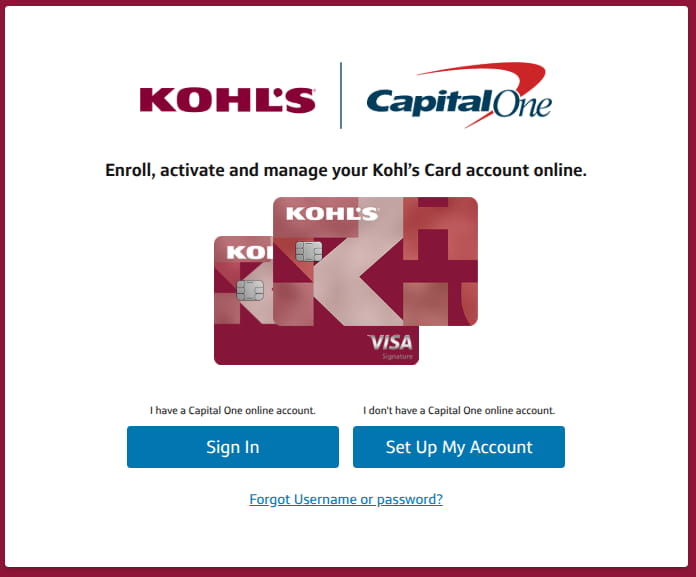
- Launch your Google Chrome or Safari and Head to Kohls.capitalone.com. Tap Sign In.

- Once you click on the sign-in, you’ll be redirected to verified.capitalone.com.
- Next, enter your username and password. If the account is new, you can set it up by following the on-screen steps using your card details.
- After signing in, head to the account or billing area. This is where you can see your current balance, minimum payment, and due date.
- Now you can pay the minimum due, the full balance, or a custom amount after linking your checking or savings account. Make sure there are no typos when you link your payment source.
- Or you can set up Autopay or schedule payment, whatever suits your needs.
Once submitted, the payment usually shows as pending quickly and posts within a business day.
Pay Using the Kohl’s Mobile App
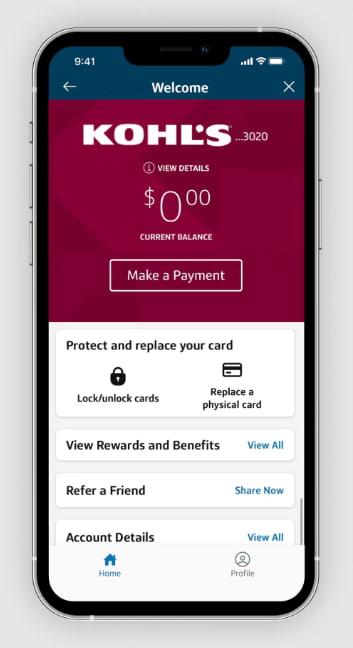
The Kohl’s app offers the same tools as the website, but in a phone-friendly layout. Paying through the app feels natural for people who already shop on mobile.
After signing in, you can tap to make a payment, review the balance, and confirm. Payments often show as pending right away, which adds reassurance.
Using the app also helps with checking statements while on the go, especially when tracking spending habits.
Paying by Phone:
Not everyone wants to pay online, because it’s so cumbersome. However, it doesn’t require the Internet, which is quite useful in some ways.
Luckily, Kohl’s allows payments by phone through the customer service number on the back of the card. You can follow the automated system or speak to a representative, depending on preference.
When paying by phone:
- Have the card number ready.
- Know the bank account details.
- Confirm the payment amount carefully.
This method feels familiar to many people who prefer hearing confirmation spoken aloud.
Paying Your Bill In-Store
In-store payment is another solid option, especially for shoppers who visit Kohl’s often.
At the register or customer service desk, you can pay the credit card bill using cash, debit, or check. This method offers instant confirmation, which feels reassuring.
Some cardholders prefer in-store payments because:
- The payment posts quickly.
- There is no need for online access.
- A receipt is provided immediately.
Paying in person also creates a habit. Shopping and paying together. Simple and controlled.
Paying by Mail:
Paying by mail may feel old-school, but for some people, it still brings peace of mind. Writing a check, sealing the envelope, and sending it off can feel more deliberate and controlled.
This option works well for those who like having a paper trail and prefer taking care of bills the traditional way, as long as enough time is given for delivery.
However, when paying by mail, you must send the check early, because delivery takes time. The payment is credited based on when it is received, not when it is sent.
To avoid issues:
- Write the account number on the check.
- Include the payment slip.
- Mail several days before the due date.
When Payments Post and Why Timing Matters
Payment timing can affect the account more than expected. Processing Times to Keep in Mind.
- Online and app payments often post within one business day.
- Phone payments may post the same or the next day.
- In-store payments often post quickly.
- Mail payments take the longest.
How To Set Up Automatic Payments
Setting up automatic payments is a good way to stay on track without having to think about due dates every month. Once it is set, payments happen in the background, saving time and worry.
Step 1: Sign in to your Kohl’s account
Go to the official Kohl’s website or open the mobile app. Log in using your username and password.
Step 2: Go to the billing or payment section
After signing in, look for the payments, billing, or account settings area. This is where AutoPay options are usually listed.
Step 3: Choose automatic payments
Select the option for AutoPay or automatic payments. You may be asked to confirm that you want payments to run each month automatically.
Step 4: Pick the payment amount
You can choose to pay:
- The minimum payment
- The full statement balance
- A fixed custom amount
Step 5: Add or confirm your bank account
Link a checking or savings account if one is not already saved. Double-check the details to avoid delays.
Step 6: Review and confirm
Review the payment amount, bank details, and withdrawal timing. Once everything looks right, confirm the setup.
After AutoPay is active, payments will be fetched each month automatically. It is still a good habit to check statements now and then, but AutoPay helps take one more thing off your plate and keeps late fees away.
A Few Things To Avoid
Even simple systems can cause trouble if details are missed. Some frequent mistakes include:
- Paying after the cutoff time on the due date.
- Sending mail payments is too late.
- Forgetting to confirm a submitted payment.
- Assuming pending payments are already posted.
Avoiding these mistakes comes down to checking confirmations and planning, because small delays can cost money.
Wrapping It Up
Did you see? Paying a Kohl’s Credit Card bill is not complicated. With options like online, app, phone, in-store, and mail payments, you can choose what fits your needs.
All you need to do is understand timing and choose the right payment amount. And with little consistency and a proper strategy, you can streamline your payment.